
ippi Centrex · cloud phone system

Phone system examples: 4 setups ready to copy

From a number ringing on a single phone to an IVR menu routing each call to the right team: here is how ippi Centrex customers handle their incoming calls, with the messages to record.

1

The number rings straight through to one phone

Who is it for? Freelancers, tradespeople, independent professionals: a single contact, reachable on an IP phone, a computer or a web browser.

Caller Your number A user

What the caller hears

No message: the call comes straight through. If nobody answers, the caller reaches voicemail, and the voice message is sent to you by email.

How to set it up

  1. 1 Create the user: their SIP credentials are displayed, for their IP phone or app.
  2. 2 On your number, choose "User" as the destination.
2

A greeting message and your business hours

Who is it for? Practices, shops, small agencies: a professional greeting during opening hours, a clear message in the evening and at weekends.

Caller Your number Business hours
Open Greeting A user
Closed Closing message Voicemail

What the caller hears

"Hello, you have reached Martin Plumbing. Please hold, we are taking your call."
Closing message"We are closed. We are available Monday to Friday, 8 am to 6 pm. Please leave a message and we will call you back."

How to set it up

  1. 1 Create the user who will answer.
  2. 2 Upload your audio messages (WAV or MP3 file): greeting and closing.
  3. 3 Set your time slots, for example "Weekdays".
  4. 4 Create a conditional route: on weekdays, to the user; otherwise, to the closing message then voicemail.
  5. 5 On your number, choose this conditional route.
3

A team answering, with a call queue

Who is it for? Estate agencies, customer service, team reception: several people answer the same number and no call is lost.

Caller Your number Business hours
Open Greeting Call queue
Closed Voicemail

What the caller hears

"Hello and welcome to Durand Agency. All our advisers are busy, please hold."

While waiting, over the music: "Thank you for your patience, an adviser will be with you shortly."

How to set it up

  1. 1 Create one user per team member.
  2. 2 Upload your hold music and greeting message.
  3. 3 Create the call queue: add the members, choose how calls are distributed and the maximum waiting time before voicemail.
  4. 4 Set your time slots, then a conditional route: open, to the queue; closed, to voicemail.
  5. 5 On your number, choose this conditional route.
4

An IVR menu routing each call to the right team

Who is it for? Businesses with several departments, town halls, local authorities, schools, clinics or charities: every call reaches the right department without a receptionist.

Caller Your number Business hours
Open IVR menu
Key 1 Registry queue
Key 2 Planning queue
Key 0 Reception
Closed Closing message Voicemail

What the caller hears

"Welcome to Saint-Martin town hall. For births, marriages and deaths, press 1. For planning, press 2. For reception, press 0."
Closing message"The town hall is open Monday to Friday, 8:30 am to 12 pm and 1:30 pm to 5 pm. Please leave a message and we will call you back."

How to set it up

  1. 1 Create one user per desk: reception, registry, planning.
  2. 2 Upload the hold music and messages: menu greeting, closing.
  3. 3 Create one call queue per department, with its members.
  4. 4 Create the IVR menu: key 1, registry queue; key 2, planning queue; key 0, reception.
  5. 5 Set your time slots, then a conditional route: open, to the IVR; closed, to the closing message and voicemail.
  6. 6 On your number, choose this conditional route.
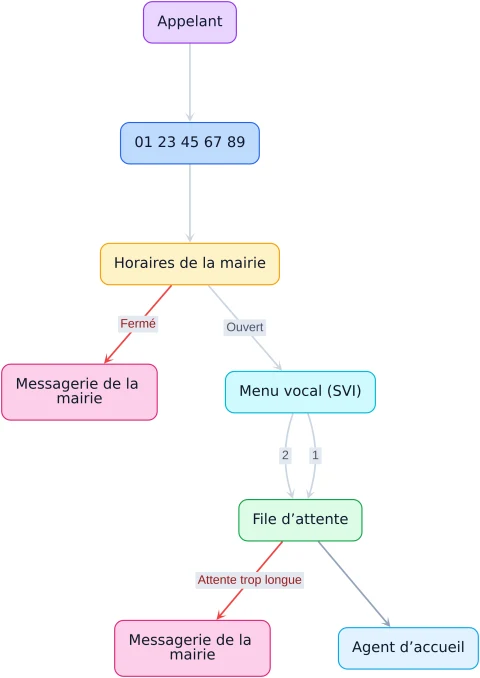
Call flow diagram in ippi Centrex: caller, town hall number, business hours (open or closed), IVR keys 1 and 2, call queue, reception agent and voicemail
In your ippi Centrex account Each number shows its call flow as a diagram: business hours, IVR menu, call queue, voicemail. You see at a glance where a call goes, and change it in a few clicks.

Ready to set up your ippi Centrex phone system?

Choose your number of plans, then copy the example that fits you.